↓ Skip to main content
[snippet]

Thundering herd on wakeups and retries

Too many waiters wake for one event — or too many clients retry at once. Waste, then collapse.

Classic forms:
  - Many threads wake on one socket/event (OS)
  - Cache expires → all clients miss together
  - Outage ends → everyone reconnects / retries

Mitigations:
  - Wake one waiter (epoll, leader-follower)
  - Jittered exponential backoff
  - Queue / lease / token so only N proceed
  - Request coalescing

Scenario: Cache TTL hits midnight; 10k pods miss Redis and stampede the origin. Origin melts, retries amplify. Stagger TTLs, single-flight the refresh, or serve stale while one worker recomputes — that’s the dogpile fix for the cache form of the herd.

[snippet]

Dogpile / cache stampede protection

When a hot key expires, only one client should recompute. Everyone else waits or uses stale.

Patterns:
  1. Mutex / lock around recompute (single-flight)
  2. Stale-while-revalidate (serve old, refresh in background)
  3. Probabilistic early expiration (jitter who refreshes first)

Related: thundering herd on the cache miss path

Scenario: Product page cache key expires under Black Friday load. Without protection, every edge node hits the DB for the same SKU. With a lock or single-flight: one recomputes, others block briefly or keep serving stale. Same idea as stampede protection in Redis/memcached clients.

[snippet]

USE method for resource checks

Brendan Gregg’s USE: Utilization, Saturation, Errors — ask all three for every resource.

For CPU / mem / disk / net / pools:

  Utilization  — how busy is it? (% busy, used/capacity)
  Saturation   — is work queued? (run queue, await, backlog)
  Errors       — is it failing? (retransmits, OOM, 5xx)

High util + low saturation  → busy but keeping up
High util + high saturation → bottleneck
Errors                     → fix correctness before tuning

Scenario: “Is the DB slow?” Check CPU USE, disk USE, connection-pool USE separately. Pool at 100% util with a wait queue (saturation) while disk is quiet usually means you’re connection-starved, not I/O-bound. Pair with RED (Rate, Errors, Duration) for the service view.
[snippet]

Thrashing: busy CPU, no progress

Thrashing is when the machine spends its time swapping pages instead of running useful work.

free -h
vmstat 1
# si/so columns (swap in/out) climbing while apps crawl

# Who is eating RSS?
ps aux --sort=-%mem | head

Scenario: Load average is high, everything feels stuck. vmstat shows constant si/so; iostat shows swap device busy. The fix is reduce the working set (fewer replicas, smaller caches, kill the leak) or add RAM — tweaking CPU nice won’t help. Pathological cousin of resource contention: the system is fully utilized on the wrong work.

[snippet]

fork, exec, and syscalls vs function calls

fork copies the process; exec replaces the image. Function calls stay in userspace; syscalls cross into the kernel.

# Shell does roughly: fork → child execve("/bin/ls") → parent wait
strace -f -e trace=clone,fork,vfork,execve ls /tmp

# Function call: printf → libc (maybe buffered)
# Syscall:      write(1, ...) actually hits the kernel
# See the boundary:
strace -e write python3 -c 'print("hi")'

Scenario: “Why does my supervisor show zombies?” Parent forked workers but never waited — children exited, slots remain until reaped. Syscall vs function call matters when debugging with strace (kernel boundary) vs ltrace (libc). A malloc is a function call; when the heap needs more memory it becomes a brk/mmap syscall.

[snippet]

du when df looks fine

df is the filesystem. du walks directories. Deleted-but-open files show in df, not under du.

df -h /var
du -xh /var --max-depth=1 | sort -h

# Biggest offenders under a tree
du -xh /var/log | sort -h | tail -20

# Space held by deleted open files (df high, du low):
lsof +L1 | head
# restart the process holding the FD, or truncate the path if it still exists

Scenario: /var is 95% full. du on /var/log doesn’t add up to df. A long-running Java process rotated logs with rm while keeping the FD open — disk stays full until restart. Find it with lsof +L1.

[snippet]

nice and renice for noisy neighbors

nice is CPU scheduling priority (−20 urgent … 19 meek). It does not cap memory or I/O by itself.

# Start a batch job that shouldn’t steal CPU from the API
nice -n 19 python /opt/jobs/reindex.py

# Already running? bump it down
renice -n 10 -p $(pgrep -n reindex.py)

# Check: NI column in top / ps
ps -o pid,ni,comm -p $(pgrep -n reindex.py)

Scenario: Nightly compaction fights daytime traffic. Wrap it in nice -n 19 so interactive workers win CPU contention. For disk-heavy jobs pair with ionice; nice alone won’t stop an I/O storm.

[snippet]

Reading iostat under load

%util and await tell different stories. High util + high await = disk is the bottleneck.

iostat -xz 1

# %user / %system  — CPU in userspace vs kernel
# %iowait         — CPU idle waiting on I/O (often disk-bound work)
# await           — avg ms per I/O (queue + service)
# %util           — % of time the device had work

Scenario: App “CPU is fine” but P99 is awful. iostat -xz 1 shows %iowait up, await in hundreds of ms, %util near 100. That’s storage saturation, not a missing index in the app alone. Cache vs buffers (free -h): page cache speeds reads; buffers are block-device staging. More RAM for cache helps until the working set fits.

[snippet]

Inodes vs file descriptors

Inode = the file on disk. FD = your process’s open handle to it. One inode, many FDs.

# Same file, two opens → one inode, two FDs
echo hello > /tmp/demo.txt
exec 3<>/tmp/demo.txt
exec 4<>/tmp/demo.txt
ls -li /tmp/demo.txt          # inode number
ls -l /proc/$$/fd/3 /proc/$$/fd/4
# both point at the same inode; closing FD 3 doesn’t delete the file

# “Too many open files” is an FD limit (ulimit -n), not inode exhaustion
# Disk full of tiny files / no free inodes: df -i

Scenario: Service fails with EMFILE. lsof -p <pid> | wc -l climbs; sockets or log handles weren’t closed. Fix the leak or raise nofile. Separate failure: df -h shows free space but writes fail — df -i shows inode table full.

[snippet]

strace vs ltrace when a process hangs

strace = syscalls into the kernel. ltrace = library calls. Start with strace when the box is sick.

# App stuck after deploy — is it waiting on the kernel?
strace -p $(pgrep -n myapp) -f -e trace=network,file,desc

# Or attach from start and follow children:
strace -f -o /tmp/myapp.strace ./myapp

# Library-level (malloc, pthread, libc):
ltrace -p $(pgrep -n myapp) -e malloc+free+pthread_mutex_lock

Scenario: API latency spikes; CPU is idle. strace shows the worker blocked in poll/recvfrom on a DB socket — not a CPU bug. If strace is quiet but the process is busy, try ltrace for userspace lock contention.

[media]

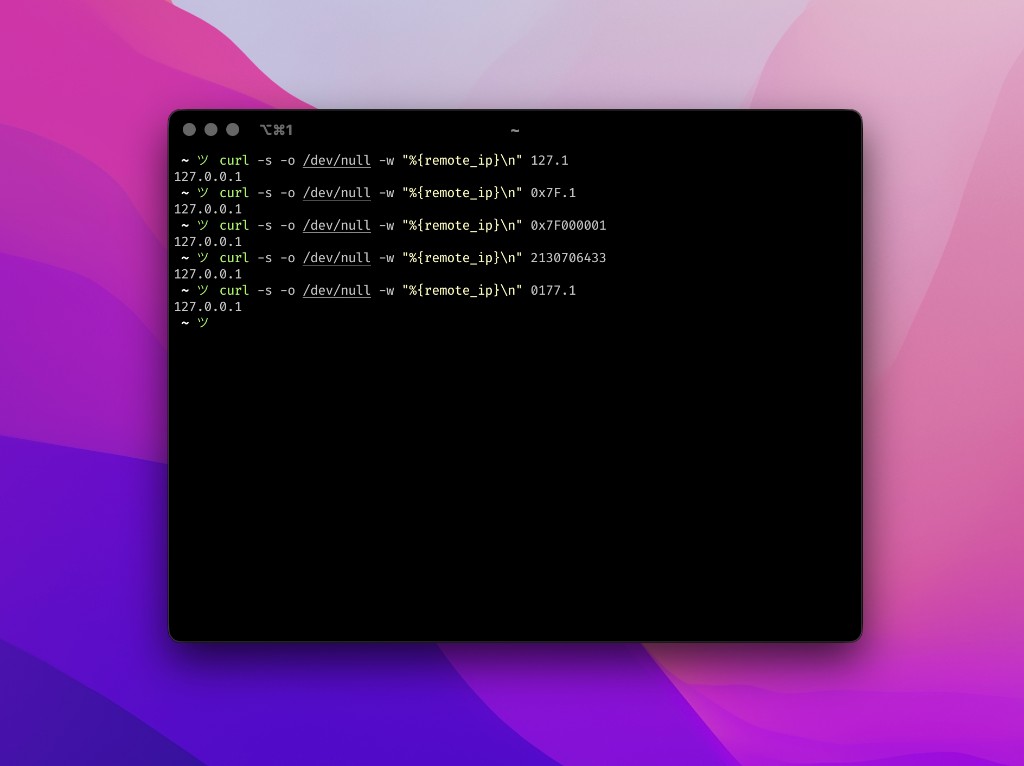
Abbreviated IPv4 expansion via inet_aton

Why curl 127.1 resolves to 127.0.0.1: BSD inet_aton treats a.b as class A (8.24 bits).

  #include <stdio.h>
  #include <arpa/inet.h>

  int main(void) {
      struct in_addr addr;
      // "127.1" -> 127.0.0.1, "0177.1" -> 127.0.0.1, "1.0" -> 1.0.0.0
      if (inet_aton("127.1", &addr)) {
          printf("Resolved: %s\n", inet_ntoa(addr));
      }
      return 0;
  }

Legacy BSD inet_aton() supports 1, 2, 3, or 4 parts: in a.b, b is evaluated as the lower 24-bit host number (a << 24) | b. Octal (0177.1) and hex (0x7f.1) prefixes work too.

[media]

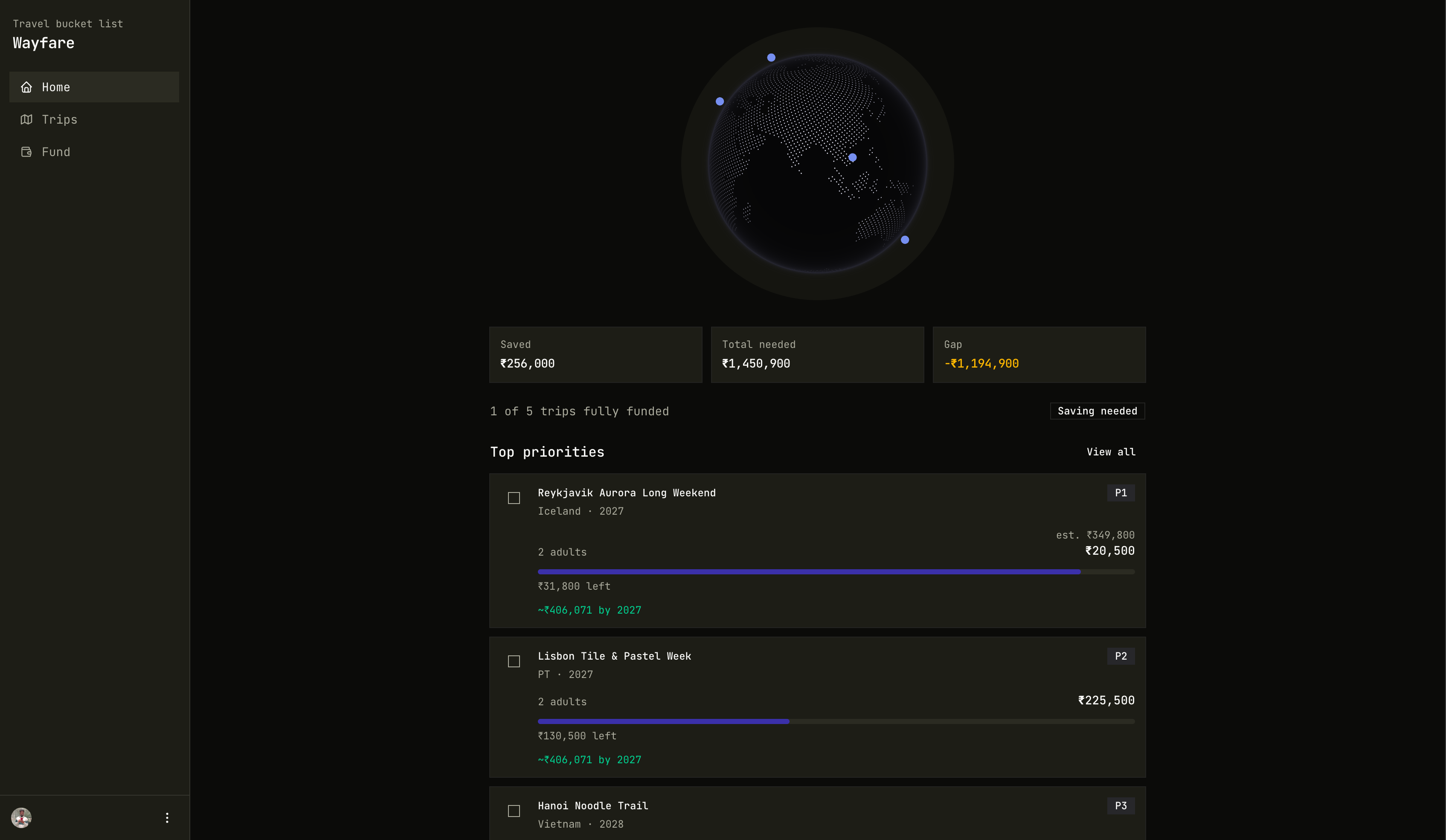
Wayfare: trip context over MCP and OAuth

Travel bucket list and savings tracker. Same trip data in Claude, Cursor, and ChatGPT, per user via OAuth.

Built partly to learn MCP OAuth and how to ship a secure, production-ready MCP server. Connect once, and each assistant only sees your trips and fund.

[snippet]

Kafka tombstones via console producer

Key + null value = tombstone. Use null.marker so the CLI can send it.

bin/kafka-console-producer.sh --bootstrap-server localhost:9092 \
  --topic my-compacted-topic \
  --property parse.key=true \
  --property key.separator=: \
  --property null.marker=NULL

# Then type: user123:NULL

Compacted topics need a null value to delete a key. The console producer’s null.marker makes that one line instead of a custom producer.

[snippet]

Delete logs older than 7 days with find

find + -mtime + -delete is safer than a recursive rm when you scope the path.

find /var/log/myapp -type f -name "*.log" -mtime +7 -print
# review the list, then:
find /var/log/myapp -type f -name "*.log" -mtime +7 -delete

Always -print first. -delete only after you’ve confirmed the match set.